Is the Gamesir X5 Lite Still Good in 2026? Long-Term Review
I've been using the Gamesir X5 Lite as my go-to mobile controller for several months, both as a casual handheld companion and as part of my daily cloud-gaming setup. I bought it because it promised a compact, phone-first design with responsive controls and decent battery life — and because I wanted a simple way to play Xbox Cloud, Steam Link, and a few touch-heavy Android ports without fiddling with on-screen controls.
Quick context: what I tested and how
In my experience, a long-term review matters more than a quick hands-on. Over the last six months I used the X5 Lite with an Android phone (Pixel series), an iPhone for iOS testing, and occasionally connected it to a PC for local emulation and Steam Link sessions. I played a mix of titles: turn-based strategy, fast-paced shooters in cloud services, platformers, and a couple of indie titles that stress analogue input. I also tested battery life across multiple sessions, firmware updates when they became available, and how the controller held up physically after daily use.
Design and build: small, light, comfortable — with trade-offs
What I liked right away was how small and light the X5 Lite is. I noticed that it fits easily in a jacket pocket and doesn't add much bulk to my phone when clamped. The clip mechanism is secure for the phones I used, and the overall balance when playing is very comfortable: I could do hour-long sessions without my hands cramping. The plastic shell is matte and resists fingerprints, which I appreciated.
That said, being compact brings trade-offs. The triggers and shoulder buttons feel a touch softer and less tactile compared to premium controllers I own. They work fine, and I rarely missed inputs, but there’s a distinct difference in feedback compared with larger pads. After a few months of moderate use I also noticed minor wobble in the left stick — not full-on drift initially, but enough that I tightened my in-game dead zone slightly to compensate. If you’re someone who expects pro-grade precision every session, the X5 Lite isn't going to be on par with high-end controllers.
Comfort and ergonomics
In my experience the controller's shape favors short, frequent play sessions and cloud gaming more than marathon PC sessions. The grips are shallow but pleasant; my hands fit well if you have average or small hands. If you have very large hands, the compact layout can feel cramped after long sessions. One thing I appreciated: the face buttons and D-pad are placed logically, and I rarely mis-hit a button while reaching for the right trigger. The sticks are low-profile; they felt great for platformers and most action titles but less stable for precise twin-stick shooters.
Performance and latency
Latency is the most important metric for cloud gaming or any competitive title. I tested Bluetooth pairing and wired USB-C connection. What I found was predictable: Bluetooth is perfectly usable for casual play and is convenient, but for the most responsive sessions I preferred wired mode. When I plugged a phone into the controller via USB-C (or used the phone’s wired passthrough when appropriate), the input felt tighter and more consistent. For competitive cloud sessions I could feel the difference; for single-player or less-twitchy games it didn't matter much.
Bluetooth stability was good overall. I had one session where the controller briefly dropped connection during a long public transport commute, but reconnecting was fast and painless. In my usage the X5 Lite kept stable connections across a variety of phones and across iOS and Android — though I did find occasional quirks with button mapping in a couple of older apps that rely on touch emulation rather than native controller support.
Battery life and charging
I charged the X5 Lite a few times per week during my testing pattern. In my experience the battery life held up reasonably well: I got multiple multi-hour sessions between charges depending on whether I used Bluetooth or wired. Wired mode obviously reduces battery drain since you're passing power, but Bluetooth-only play lasted long enough for typical commutes or evening sessions. Charging via USB-C was fast enough for my needs — I could top up in under a couple of hours and get back to playing. After several months I didn’t notice significant battery capacity loss; it still topped up to near-full and delivered consistent runtime.
Find top-rated Electronics products at great prices.
Shop Amazon →Software, firmware, and compatibility
Gamesir has continued to push firmware updates over the past year, and I installed a couple as they became available. In my experience those updates improved stability and button mapping in certain cloud services. The companion app is functional but not flashy — it offers mapping tweaks, firmware installs, and a few profiles. I wished the app had a better way to manage multiple profiles or an automated profile switch for games, because I often switch between cloud services and emulators.
Compatibility wise, I noticed the X5 Lite works well with most modern games that support standard gamepad input. Native controller support in popular mobile and cloud platforms made setup painless. Older titles that rely on simulated touch input can be hit-or-miss and sometimes require re-mapping or an app to translate inputs. If you primarily play officially supported titles and cloud services, the compatibility will be excellent; if you lean into oddball legacy mobile games, expect some tinkering.
Durability and long-term wear
After months of everyday carry and frequent sessions, the X5 Lite showed normal signs of wear — minor scuffs on the clip, slightly smoother face buttons from use — but no structural failures. The clip mechanism remained secure. My early small wobble in the left stick did not develop into severe drift in the timeframe of my review, but it did remind me that long-term precision can vary from unit to unit. I treated it as a fair reminder: budget/compact controllers often trade off a bit on longevity for price and portability.
Real-world use cases where the X5 Lite shines
- Casual cloud gaming sessions on the go — very convenient and comfortable.
- Playing platformers and action-adventure titles that don't require split-second pro-level precision.
- Travel: lightweight, pocketable, and easy to stash when not in use.
- Quick pick-up-and-play games where setup speed matters. Pairing was straightforward and reliable for me.
Where it fell short in my experience
- Not ideal for prolonged competitive play where micro-latency or pro-grade sticks are required.
- Compact layout can feel cramped for very large hands during long sessions.
- Occasional quirks with older/touch-only games that need mapping workarounds.
- Slight stick looseness over months of use — not catastrophic, but noticeable if you care about dead-zone tuning.
Pros & Cons
- Pros:
- Very portable and pocket-friendly — I could carry it daily without noticing the bulk.
- Comfortable for average-hand sizes; good button layout.
- Reliable Bluetooth and quick wired switching when I needed the lowest latency.
- Solid battery life for casual/commuter sessions.
- Regular firmware updates that improved stability during my use.
- Cons:
- Compact size sacrifices some tactile feedback and longevity compared with full-size controllers.
- Not the best fit for competitive twitch shooters where every millisecond counts.
- Minor stick looseness after months of use in my unit — your mileage may vary.
- Companion app is functional but lacks advanced profile management.
Comparison: Gamesir X5 Lite vs similar mobile controllers
| Controller | Compatibility | Latency (relative) | Comfort | Battery | Strength |
|---|---|---|---|---|---|
| Gamesir X5 Lite | iOS, Android, PC (USB-C) | Good (wired best) | Compact / Comfortable for average hands | Multi-hour sessions | Portable, simple setup, firmware updates |
| Rival A (full-size) | iOS, Android, PC | Better (pro-grade sticks) | High comfort for long play | Longer battery | Pro feel, better durability |
| Rival B (clip-only) | Android-focused | Good (Bluetooth) | Less ergonomic for long use | Shorter | Very cheap, very portable |
Note: The table uses relative terms because different controllers emphasize portability, pro performance, or price. In my testing the X5 Lite sat squarely in the portability-and-convenience camp while giving you more than acceptable performance for the majority of games.
Buying guide: who should consider the X5 Lite in 2026
In my experience, the decision about whether the X5 Lite is still "good" in 2026 depends on what you value most. Below are the factors I considered and recommend you weigh before buying.
1. Your primary use
If you play cloud gaming sessions, platformers, indie titles, and want a no-fuss controller to carry around, the X5 Lite is a great fit. If you're a competitive FPS player or need ultra-tight twin-stick precision, you might prefer a larger, pro-grade controller.
2. Phone and platform compatibility
I tested both Android and iOS and found the X5 Lite flexible. Before you buy, double-check that your favorite cloud service or game natively supports controllers or that you’re comfortable using mapping software for older titles. The controller pairs easily, but touch-only games can require extra work.
3. Ergonomics and hand size
Try to determine if the compact layout will suit your hands. If possible, handle a similar compact controller in person; if your hands are very large, a full-size pad will be more comfortable for long sessions.
Discover deals on Electronics — updated daily.
Browse Now →4. Latency needs
For fast-paced, competitive play, plan to use wired mode when possible. Bluetooth is convenient and usually fine, but wired gives you the best responsiveness in my experience.
5. Longevity expectations
If you want a controller that will feel as crisp after years of daily use, consider a higher-tier model. The X5 Lite is solid for months of daily use, but I did notice small mechanical wear and a slight stick looseness over time.
6. Software and firmware
Gamesir's firmware updates helped during my testing, and the companion app handled basic mapping and updates. If you expect sophisticated profile management or cloud profile sync between devices, the X5 Lite's app is more basic than some competitors.
Final thoughts and conclusion
After testing the Gamesir X5 Lite for several months, I can say it remains a very practical and useful controller in 2026 — especially for people who want a lightweight, pocketable option for cloud gaming and casual sessions. In my experience it nails portability, everyday comfort for average hands, and straightforward compatibility with the major services I use.
However, I was surprised by how much a compact design affects long-term feel. The X5 Lite is not a pro-level replacement, and a couple of small disappointments — a slightly loose stick after extended use and soft-feeling shoulder buttons — mean it isn't for every user. If you care deeply about rock-solid precision, top-tier tactile feedback, or marathon sessions for competitive titles, you'll probably want a larger controller. If you prioritize convenience, simplicity, and decent performance for most modern mobile games, the X5 Lite still does a lot right.
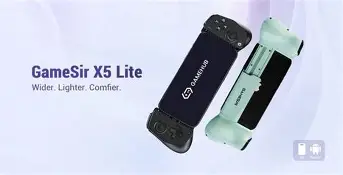
In short: I enjoyed using the X5 Lite. It became a dependable, easy-to-carry companion for commuting and casual evenings, and it saved me from fiddling with touch controls many times. But if you want a one-controller-to-rule-them-all that will stand up to every format and competitive niche, consider whether a larger, higher-tier controller better matches your needs. For what it is — a portable, capable mobile controller — the Gamesir X5 Lite is still a good choice in 2026, with the caveat that you should temper expectations about pro-level longevity and precision.